Archive for the 'ERGONOMIC KEYBOARD' Category
Are keyboard operations annoying you? Want to make your natural wrist alignment easier?
Poor posture in typing can be quite painful in the long run writers.
Correcting the wrong postures may not seem to be an easy task and neglecting the wrong posture can be quite daunting.
If you are one of the people who think in this way then Microsoft Natural Ergo Keyboard 4000 is the best answer.
The first look at the keyboard may not give you the positive effect but once you use the key board you will love to work on the keyboard even more.
The unconventional design of the Microsoft Natural Ergo Keyboard 4000 promises you the best posture of your hands while typing. The keys of this keyboard look like seagull’s wings and enhance the design of the keyboard.
Have you ever wondered that your desktop computer occupies larger space? Want to lessen the space it occupies? You must be thinking that this article is explaining about some laptop or notebook that minimizes the space of the computer and provide the features of the computer. No, it is not referring any laptop or notebook that brought the vast computer into the lap size.

Even usage of the laptop has many problems and disadvantages, so now-a-days many people are not showing interest in the wide usage of the laptops [Laptop ergonomics].
Have you ever thought that the desktop computer must be small and compact giving the same feature of the computer and cutting down the adverse effects of laptop and note book? Then there is a solution for this problem, CYBERNET has come up with an innovative idea of comprising the 3-pieces desktop computer into 2-piece desktop computer.

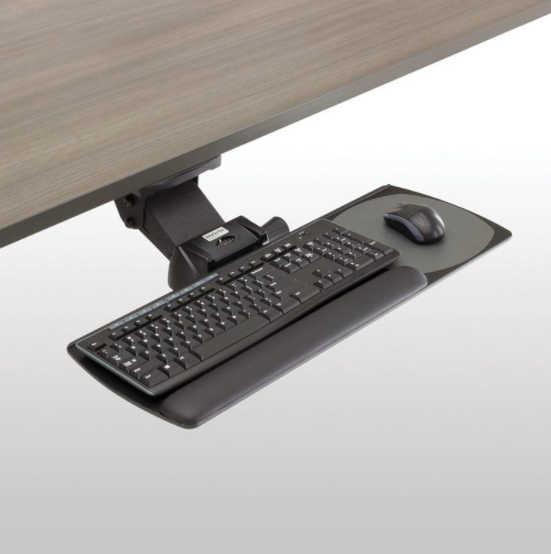
This complete keyboard arm with W/27 inch universal platform makes your hands feel comfortable while working on your system.
It also makes your hand to stay or act in the right way so that you will not be affected with various problems like RSI (repetitive strain injury), CTS (carpal tunnel syndrome), etc.
The product features of this complete keyboard arm W/27 inch universal platform are:
- This keyboard tray system includes a steady lift arm on a retractable split nylon glide track with the length of 17” or 21 7/8”.
- It also offers a knobless lock height adjustment and a spring assisted lift of 7” i.e. 6” below the work surface and 1” above the mounting track.
- It offers both negative and positive tilt with the single arm to accommodate for the various optimal positions for different needs.
Purchasing the right keyboard will be always helpful for you and the usage of keyboard in the right manner reduces the occurrence of Repetitive Strain Injury (RSI) problem.
Following the right tips and tricks can be helpful in avoiding the problem of RSI.
Tips while selecting and using the keyboard:
- Selection of the keyboard: This plays an important role while working on your computer for long period of time. You will not get pains and strains when you use ergonomic keyboards, where as the normal one can affect you.
- Before purchasing the keyboard, work on the keyboard and check whether it is comfortable for you to work or are you facing any difficulty while working on it.
- In some cases, even the ergonomic keyboards will create strain on your hands as they are not used in the right way. Not all the ergonomic products will give better results for you, it all depends on the way you use it.
The main feature of this wireless entertainment desktop 8000 includes the rechargeable mouse and backlit keyboard.
The Microsoft’s exclusive charging hub allows you to recharge both keyboard and mouse in one easy to use place. [Ergonomic Keyboard]
2.4 GHz Bluetooth technology is used in this desktop, so you can connect wirelessly right out of the box with this first connection technology for up to 30 feet with no virtual interference.
Battery status indicator is also connected in this desktop. It makes you to know the life of the battery and the indicator senses when the battery life is running out.
The integrated 4 USB ports present in the charging station makes you to attain the flexibility of downloading images from your digital camera or plug in your thumb drive or other USB device. You will attain the total wireless freedom form this desktop in all aspects.
High definition laser technology is used in this wireless laser desktop 6000.
Products, which are made with this technology will be more responsive, more precise and also delivers smoother tracking.
The battery status indicator is present in it, which allows you to know when the power is low, what’s your battery status and also senses when the battery life is running out.
This wireless laser desktop 6000 is made in ultra thin comfort curve design. With this you will feel free while using this ergonomic keyboard because you can work comfortably by placing your hands naturally in it.
Some buttons which will be used more while using the keyboard are featured on the top of this keyboard. They are:
Windows live call button: By just pressing this button, you can access the list of your live messenger contacts. By just selecting the online contact you can start the video conversation.
This ergonomic keyboard is plugging compatible with any type of computer, software and operating system.
It is more easy to use and no strain will be created at your wrist with this keyboard. Extended drivers or software is not required for the usage of this keyboard.
The various hardware features of this datahand ergonomic keyboard- professional II are:
- It is designed in the form of QWERTY key layout which includes a 10-key number pad on the right hand module.
- You can adjust the keys present in this keyboard both horizontally and vertically.
- The incline modules of this keyboard raises from 0 degrees to 10 degrees.
- The key actuation distances present in this keyboard is 88% less when compared to other normal flat keyboards.
- It also features built-in programmable mouse and the key actuation forces are also 50% less than flat keyboards.
This Kinesis Maxim adjustable ergonomic computer keyboard is an award winning keyboard, and it is the only accessory, which has license to use Microsoft “combo” USB/PS2 technology.
If your system has PS/2 port, then you have to include PS/2 adopter while using this keyboard.
Your work will become easier with this keyboard in various ways, like with one keyboard you can connect to windows, Linux, Mac, sun systems, as well as legacy PS/2 systems.
This keyboard is more versatile and much narrower, when compared to other “natural-style” keyboards.
This kinesis maxim adjustable ergonomic keyboard also accommodates a wide range of user preferences.
Product features:
- It is a variable split keyboard which has more flexibility when compared to other natural keyboards. No adaptation is required for this keyboard and you can select any opening between 0 to 30 degrees.
This orbitouch keyless ergonomic keyboard is revolutionary keyless equipment which removes the barrier posed by the traditional mouse/keyboard combination.
The persons who have repetitive stress injuries like carpal tunnel syndrome will get benefit by the usage of this keyboard.
The comfortable design of this ergonomic keyboard will makes the ease of usage and it is the ideal tool for computing and accessing internet. An integrated mouse is connected in this keyboard and it creates a keystroke when you slide the two domes into one of their eight respective positions.
The usage of fingers is not required while using this orbitouch keyless ergonomic keyboard. So, it reduces repetitive strain injury (RSI) motions up to 82% which are caused over standard flat keyboards.
It is easy to use this ergonomic keyboard. Basically this keyboard comes along with a typing tutor program with on screen help.
Every computer comes with a keyboard. There is no need to think about keyboards. But there are many complaints about the keyboards which do not focus on ergonomics.
Many of them avoid using standard keyboard because of design and integrated functions present in fancy keyboards.
If you spend a lot of time in front of the computer, you are advised to buy an ergonomic keyboard. Ergonomic keyboards reduce strain on the wrists. These keyboards are split into two segments.
It may also consist of a track ball as a mouse. It prevents you from holding your hands at improper angles, which further prevents repetitive strain injuries in the long run.
Curved keyboards are about optics not ergonomics. Keyboards with piano optics are trendy right now. Keyboards with extra integrated functions can also become easy when working on computer.
Recent Posts
- What Is The Perfect Posture That Avoids Posture Related Problems?
- Know About RSI-Shield That Cuts Down The Risk Of RSI!
- Salient Wireless Pen Mouse VM-203 To Avoid CTS!
- Cooler Master NotePal Infinite To Enhance The Life Of The Laptop!
- Ergonomic Mouse Pads to Minimize Your Wrist Pains!
- What Are The Common Mistakes That Lead To Posture Problems?
- 10 IT Health Risks And How To Combat Them
- Ambidextrous Design Of Microsoft Wireless Notebook Optical Mouse To Give Smoother Tracking Facility!
- Pain In The Neck? It Could Be RSI
- Microsoft Natural Ergo Keyboard 4000 Makes Your Operations On The Keyboard Easy!