Archive for the 'ERGONOMIC ACCESSORIES' Category
Are you a person who works mostly with mouse [Ergonomic Mouse] or spend much of your time with only mouse? Then you must be familiar with different musculoskeletal disorders which affect wrists, shoulders, palms [Palm Support] and fingers.
If this is ignored, you can even end up with many disorders such as losing grip over the hand, feel like pain in mid-nights and not able to work on the mouse.
The best solution to avoid all these problems is to use ergonomic products which help you in avoiding unnecessary tension regarding the wrist, palm, hand or fingers.
Even computer professionals or people who work for longer hours on the computer do not know the correct posture while working with mouse. So, with this posture problem, Carpal Tunnel Syndrome (CTS) or musculoskeletal disorders will be developed.
Ergonomic products are designed to reduce the pain or inconvenience, which occur in your body when you work in front of your computer for long period of time.
You cannot expect which type of pain or problem may occur to you in the starting days of working with your computer.
It all depends upon the time you spend in front of your computer, working environment, comfort levels, your position, etc.
Not all the ergonomic products are best ones! The recent studies have proved that not all the ergonomic products are suitable for all. Depending on your necessity and seating position, you have to select the right ergonomic product which is suitable for you.
Steps to follow while purchasing right ergonomic products which are suitable for you:
Other than purchasing, care and maintenance of the ergonomic product is the most essential aspect.
With proper care and maintenance, you can make your product to stay fine for long period of time without any discomfort, whereas the improper maintenance makes your ergonomic product to become worse and the lifetime of the product will also be reduced.
Not all the products require the same type of caring.
Each and every product will be differing from one another depending on its shape and model.
Some ergonomic products even include some precautions and caring aspects which must be followed compulsorily while using them.
Tips on how to take care of your ergonomic products in the right way:
- Mostly you have to check for the caring and maintenance of the ergonomic products before buying the ergonomic products itself. If you are capable to take care of it in the right way, then only you have to get that particular product otherwise go for the another one which require less maintenance.
Everyone feels pain at their palm area if they work for long period with a keyboard or mouse.
This problem generally arises due to the strain produced at the palms as they are put in pressure for long period of time.
This goldtouch blue gel filled palm supports allows you to fit the stress dispersing, soft gel pads to each hand individually when you are working with keyboard in front of the system [Tips to ease the stress].
These palm supports are finished in smooth lycra and the wrist rests stays easily on the skin as they are on the muscles.
Some other Features of the goldtouch blue gel filled palm supports are:
- These ergonomic wrist rests makes your hands to stay in the most comfortable position and they don’t make your hands to feel strain while using them.
Wedge-ease ergonomic forearm support is an inexpensive solution to employee discomfort.
Benefits of wedge-ease forearm support:
- Wedge-ease forearm support is an inexpensive solution to your discomfort while working at the desk.
- This forearm support is helpful when you need hand and forearm support during seated work tasks.
- It helps to eliminate contact stress from work surface edges.
- It helps to support wrists in a neutral position and reduce neck and back fatigue.
- This reduces the risk of RSI due to awkward postures. [Repetitive Strain Injury Treatment]
- You can easily clean this forearm support by using mild detergents.
- You can find this in different sizes according to your needs.
- Wedge-ease occupies less work space.
Features of wedge-ease forearm support:
- This is made of a soft, durable vinyl with a non slip base.
- This is highly resilient and soft foam core.
Kantek LCD glare filters are mainly designed for today’s desktop LCD monitors.
This is lightweight and has frameless design, which offers you an attractive and slim glare protector.
This filter has strong plastic brackets on the top which help to fix the filter over top of the monitor and allow for secure placement. This is very easy to install and remove.
When you use CRTs, it can seriously impact your LCD screen images due to the illumination from overhead lights, lamps and also sunlight.
It becomes very difficult to read the text. This LCD glare filter protects you against uncomfortable ill effects of screen glare. [Ergonomic Monitor]
Benefits of Kantek LCD glare monitor:
- This filter eliminates up to 95% of screen glare.
- The filter protects your screen against accidental contact with delicate LCD display and it minimizes the dust and dirt created on the screen.
Bigtrack trackball consists of 3 inch trackball, so it is named as the largest trackball available out of all other products.
It is built ruggedly and requires less fine motor control when compared to other normal standard trackballs.
This trackball also features right and left mouse click buttons and these are located behind the trackball in order to avoid the unwanted mouse clicks. Second mouse connection is also allowed by this big track.
Small children loves to work with this trackball as the structure of it attracts them a lot and the mouse clicks are also simple and easy for them.
Some other Features of this Bigtrack trackball are:
- It is easy to plug in and play installation
- The buttons of it are oversized and easy to operate
- It will be more suitable for the small children and for the people who want something different than the standard normal mouse for their computer
This Ergo-Top is the ideal or right solution for home office and “hot desking solutions.” It is easy to use this laptop ergonomics and you will attain high comfort levels with this.
Your total body posture also gets increased with it and it does not make you to attain any pains or muscles while using your laptop.
You can arrange this laptop ergonomics in five possible height settings and it also features anti-reflective and integral document holder. It can also be named as the unique security device for your mouse, keyboard and other accessories.
The features of this ergonomic product are:
- It provides five angle adjustments on the document holder from 18 degrees to 35 degrees.
- Anti reflex, recyclable and frosted material with aluminum adjustable slide rod and anti sleep feet are used in the manufacture of this product. So it will be more durable for long period of time with out damage.
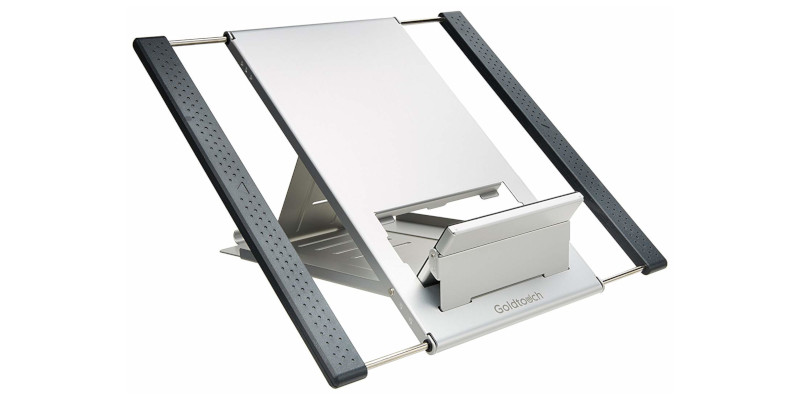
This portable laptop station is the best ergonomic support for your laptop computers.
This is said to be the best because with this, the positions of the keyboard and screen can be arranged in the more comfortable work position.
The portable laptop station elevates your laptop screen for the improved head and shoulder posture. The platform angle of it can also be adjusted in different ways in order to provide the neutral positioning for your hands and wrists.
It will not weigh much, because it is specially designed to be portable and light weight. The size and weight of this laptop ergonomics makes you to feel comfortable and convenient to carry from one place to another place without much risk.
The adjusting bar which is present in this portable laptop station can be moved both forward and backward to change the platform according to your requirement. It tilts from 0 degrees to 30 degrees.
This FPP-110 pivotpitch pole mount ergonomic monitor consists of a small flat panel pitch/pivot pole mount which can be easily attachable to the small flat panel displays to the pole. It also provides smooth pitch and pivot adjustment.
Features of FPP-110 pivotpitch pole mount:
- All the mounts of this product are attached to the poles which have the diameter of 1.5” to 2.0”.
- The design of this product is in such a way that you can easily install your monitor on the pre-existing poles.
- Single screw clamping is present in this product to adjust the monitor into your required height.
- Chief’s patent pending Centris™ Technology is used in this ergonomic monitor and it supports VESA® compliant displays of 75mm x 75mm / 100mm x 100mm.
- It consists of friction adjustable pivot points in order to support customized movements.
- The two colors available in this product are smooth black and silver metallic.
Recent Posts
- What Is The Perfect Posture That Avoids Posture Related Problems?
- Know About RSI-Shield That Cuts Down The Risk Of RSI!
- Salient Wireless Pen Mouse VM-203 To Avoid CTS!
- Cooler Master NotePal Infinite To Enhance The Life Of The Laptop!
- Ergonomic Mouse Pads to Minimize Your Wrist Pains!
- What Are The Common Mistakes That Lead To Posture Problems?
- 10 IT Health Risks And How To Combat Them
- Ambidextrous Design Of Microsoft Wireless Notebook Optical Mouse To Give Smoother Tracking Facility!
- Pain In The Neck? It Could Be RSI
- Microsoft Natural Ergo Keyboard 4000 Makes Your Operations On The Keyboard Easy!