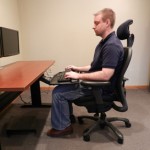

How can we practice perfect posture? This is the most common question raised by computer professionals who spends lot of their time in front of the computer. In this digital world, people spend most of their time by sitting at a desk, or staring down at their phone. If you do not maintain perfect posture, you can face many long term health problems.
Many people who are not aware of posture problems ignore the importance of maintaining proper posture, but the truth is that ignoring this can affect your overall health.
Here are the various parts of the body and how you can treat them in regard with regard to your .
Spinal cord: Always sit in a chair that provides you with proper back support and lumbar support. If you are have a proper chair with lumbar support, you can avoid unnecessary spinal cord problems as you will be minimizing the strain on the spine.
Legs: Feet should be flat on the floor and parallel to your thighs. Never make your feet fly in the air. Adjust the chair according to your requirements and see that you give support to your feet with floor or foot rest. If you do not provide proper support to the feet, you can feel pain in the knees and an area behind the knees, which is very sensitive [Leg pain].
Arm: Always keep your keyboard, mouse, trackball in same height, as this can avoid unnecessary stretching and leaning. When working on keyboard, mouse or track ball, see that the peripherals are in front of you. If you neglect this posture, you may develop problems regarding arms, wrist, shoulders and nerves in the hand.
Neck: The neck must be straight and see that you completely avoid unnecessary bending and stretching of the neck. Adjust the monitor accordingly and see that the neck do not get strained unnecessarily. Always prefer a chair that has neck holder, as this holder gives your neck muscles support and relaxation when you lean on this holder. Take proper care regarding the neck, if not you may develop spondylitis.
Eyes: When typing any document, get a document holder and place it in equal height to the monitor. This avoids unnecessary rotation of eyes, as you will be drifting your eyes between document and monitor. If proper care is not taken regarding the eyes, you may develop dry eyes, head aches and strained eyes. Always provide yourself with some anti-glare frames to control the adverse effects of the monitor.